

Giúp Đặt tên lại (Rename) cho hàng loạt các file PDF theo cùng 1 quy tắc (4 người xem)

Người dùng đang xem chủ đề này

  • Tôi tuân thủ nội quy khi đăng bài

    Excel my love_1

    Thành viên thường trực
    Tham gia
    12/11/19
    Bài viết
    334
    Được thích
    192
    Mình có 1 folder chứa các file PDF (được sắp xếp theo tên của file)
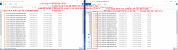
    Nhờ mọi người giúp Đặt tên lại (Rename) cho hàng loạt các file PDF này theo cùng 1 quy tắc: số thứ tự-tên file ban đầu
    Ví dụ mình có 1 folder có 26 file PDF, mình muốn Rename lại các file này theo quy tắc số thứ tự-tên file ban đầu
    ví dụ:
    + tên file PDF thứ 1 là C23TTV-00001846-U67NOUBFNE5-DPH sau khi Rename tên File này sẽ là 263-C23TTV-00001846-U67NOUBFNE5-DPH
    + tên file PDF thứ 2 là C23TTV-00001847-R67NOWVC058-DPH sau khi Rename tên File này sẽ là 264-C23TTV-00001847-R67NOWVC058-DPH
    + tên file PDF thứ 3 là C23TTV-00001848-Y67NOYMX6H1-DPH sau khi Rename tên File này sẽ là 265-C23TTV-00001848-Y67NOYMX6H1-DPH
    .................
    + cứ như vậy cho đến file PDF cuối cùng là C23TTV-00002772-S6CAMIK6117-DPH sau khi Rename tên file này sẽ là 288-C23TTV-00002772-S6CAMIK6117-DPH
    (Xem ảnh minh họa để tiện theo dõi) :help:
    rename pdf.png
     
    Có hai cách để điều chỉnh bạn xem thử nhé.
    1. Dùng Total commander, lên google tìm các bản Portable (không cần cài đặt).
    Sau đó theo hướng dẫn: https://tinhoctoday.com/thu-thuat/doi-ten-file-hang-loat-voi-total-cmd.html
    Chỗ ô Rename mask: file name
    1681522172821.png
    Ưu điểm trực quan, vừa ý thì mới bấm điều chỉnh tên. Kiểm soát tốt hơn.

    2. Dùng code sau:
    PHP:
    Sub RenamePDFFiles()
        Dim objFSO As Object
        Dim objFolder As Object
        Dim objFile As Object
        Dim i As Long
        Dim fd As FileDialog
      
        Set objFSO = CreateObject("Scripting.FileSystemObject")
      
        Set fd = Application.FileDialog(msoFileDialogFolderPicker)
        fd.Title = "Chon thu muc chua PDF can doi ten"
        If fd.Show = -1 Then
            Set objFolder = objFSO.GetFolder(fd.SelectedItems(1))
            i = 1
            For Each objFile In objFolder.Files
                If LCase(objFSO.GetExtensionName(objFile.Name)) = "pdf" Then
                    objFile.Name = i & "-" & objFile.Name
                    i = i + 1
                End If
            Next objFile
          
            Set objFolder = Nothing
        End If
      
        Set objFSO = Nothing
        Set objFile = Nothing
        Set fd = Nothing
    End Sub
    Chạy đoạn code này, chọn thư mục cần đổi tên các file có đuôi *.PDF.
    Lưu ý thứ tự các file sẽ đặt tên theo cách của Windows.
     
    Lần chỉnh sửa cuối:
    Góp file này, A3:A hiển thị tên các file trong thư mục, B3:B Tạo tên mới.
    Rich (BB code):
    Sub Laytenfile()
        Dim folderPath As String
        Dim fileName As String
        Dim i As Integer
        With Application.FileDialog(msoFileDialogFolderPicker)
            .AllowMultiSelect = False
            If .Show = -1 Then
                folderPath = .SelectedItems(1)
            End If
        End With
        If folderPath = "" Then Exit Sub
        Range("A1").Value = folderPath
        Range("A3:A10000").ClearContents
        i = 3
        fileName = Dir(folderPath & "\*.*")
        Do While Len(fileName) > 0
            Range("A" & i).Value = fileName
            i = i + 1
            fileName = Dir()
        Loop
        Columns("A").AutoFit
        If Columns("A").ColumnWidth < 35 Then
            Columns("A").ColumnWidth = 35
        End If
        Columns("B").ColumnWidth = Columns("A").ColumnWidth
    End Sub
    
    Sub Doitenfile()
        Dim folderPath As String
        Dim i As Integer
        folderPath = Range("A1").Value
        For i = 3 To Range("A" & Rows.Count).End(xlUp).Row
            If Range("B" & i).Value <> "" Then
                If Dir(folderPath & "\" & Range("A" & i).Value) <> "" Then
                    Name folderPath & "\" & Range("A" & i).Value As folderPath & "\" & Range("B" & i).Value
                    fileCount = fileCount + 1
                End If
            End If
        Next i
        MsgBox "Da doi ten " & i - 3 & " file"
    End Sub
     

    File đính kèm

    Có hai cách để điều chỉnh bạn xem thử nhé.
    1. Dùng Total commander, lên google tìm các bản Portable (không cần cài đặt).
    Sau đó theo hướng dẫn: https://tinhoctoday.com/thu-thuat/doi-ten-file-hang-loat-voi-total-cmd.html
    Chỗ ô Rename mask: file name
    View attachment 289037
    Ưu điểm trực quan, vừa ý thì mới bấm điều chỉnh tên. Kiểm soát tốt hơn.

    2. Dùng code sau:
    PHP:
    Sub RenamePDFFiles()
        Dim objFSO As Object
        Dim objFolder As Object
        Dim objFile As Object
        Dim i As Long
        Dim fd As FileDialog
     
        Set objFSO = CreateObject("Scripting.FileSystemObject")
     
        Set fd = Application.FileDialog(msoFileDialogFolderPicker)
        fd.Title = "Chon thu muc chua PDF can doi ten"
        If fd.Show = -1 Then
            Set objFolder = objFSO.GetFolder(fd.SelectedItems(1))
            i = 1
            For Each objFile In objFolder.Files
                If LCase(objFSO.GetExtensionName(objFile.Name)) = "pdf" Then
                    objFile.Name = i & "-" & objFile.Name
                    i = i + 1
                End If
            Next objFile
         
            Set objFolder = Nothing
        End If
     
        Set objFSO = Nothing
        Set objFile = Nothing
        Set fd = Nothing
    End Sub
    Chạy đoạn code này, chọn thư mục cần đổi tên các file có đuôi *.PDF.
    Lưu ý thứ tự các file sẽ đặt tên theo cách của Windows.
    Cảm ơn bạn, hướng dẫn của bạn rất chi tiết và giúp ích cho mình rất nhiều trong công việc. Cảm ơn bạn nhiều,
    Bài đã được tự động gộp:

    Góp file này, A3:A hiển thị tên các file trong thư mục, B3:B Tạo tên mới.
    Rich (BB code):
    Sub Laytenfile()
        Dim folderPath As String
        Dim fileName As String
        Dim i As Integer
        With Application.FileDialog(msoFileDialogFolderPicker)
            .AllowMultiSelect = False
            If .Show = -1 Then
                folderPath = .SelectedItems(1)
            End If
        End With
        If folderPath = "" Then Exit Sub
        Range("A1").Value = folderPath
        Range("A3:A10000").ClearContents
        i = 3
        fileName = Dir(folderPath & "\*.*")
        Do While Len(fileName) > 0
            Range("A" & i).Value = fileName
            i = i + 1
            fileName = Dir()
        Loop
        Columns("A").AutoFit
        If Columns("A").ColumnWidth < 35 Then
            Columns("A").ColumnWidth = 35
        End If
        Columns("B").ColumnWidth = Columns("A").ColumnWidth
    End Sub
    
    Sub Doitenfile()
        Dim folderPath As String
        Dim i As Integer
        folderPath = Range("A1").Value
        For i = 3 To Range("A" & Rows.Count).End(xlUp).Row
            If Range("B" & i).Value <> "" Then
                If Dir(folderPath & "\" & Range("A" & i).Value) <> "" Then
                    Name folderPath & "\" & Range("A" & i).Value As folderPath & "\" & Range("B" & i).Value
                    fileCount = fileCount + 1
                End If
            End If
        Next i
        MsgBox "Da doi ten " & i - 3 & " file"
    End Sub
    Cảm ơn bạn, cách của bạn cũng rất hay và giúp ích cho mình rất nhiều trong công việc. Cảm ơn bạn nhiều,
     
    Góp file này, A3:A hiển thị tên các file trong thư mục, B3:B Tạo tên mới.
    Rich (BB code):
    Sub Laytenfile()
        Dim folderPath As String
        Dim fileName As String
        Dim i As Integer
        With Application.FileDialog(msoFileDialogFolderPicker)
            .AllowMultiSelect = False
            If .Show = -1 Then
                folderPath = .SelectedItems(1)
            End If
        End With
        If folderPath = "" Then Exit Sub
        Range("A1").Value = folderPath
        Range("A3:A10000").ClearContents
        i = 3
        fileName = Dir(folderPath & "\*.*")
        Do While Len(fileName) > 0
            Range("A" & i).Value = fileName
            i = i + 1
            fileName = Dir()
        Loop
        Columns("A").AutoFit
        If Columns("A").ColumnWidth < 35 Then
            Columns("A").ColumnWidth = 35
        End If
        Columns("B").ColumnWidth = Columns("A").ColumnWidth
    End Sub
    
    Sub Doitenfile()
        Dim folderPath As String
        Dim i As Integer
        folderPath = Range("A1").Value
        For i = 3 To Range("A" & Rows.Count).End(xlUp).Row
            If Range("B" & i).Value <> "" Then
                If Dir(folderPath & "\" & Range("A" & i).Value) <> "" Then
                    Name folderPath & "\" & Range("A" & i).Value As folderPath & "\" & Range("B" & i).Value
                    fileCount = fileCount + 1
                End If
            End If
        Next i
        MsgBox "Da doi ten " & i - 3 & " file"
    End Sub
    Bác ơi em thấy file của bác hay quá. Hiện nay em muốn rename không theo theo Số thứ tự nữa mà theo chuỗi text bất kỳ (em tự dán vào cột B) thì sửa như nào, bác giúp em với ạ.
    em đội ơn bác
     

    Bài viết mới nhất

    Back
    Top Bottom